
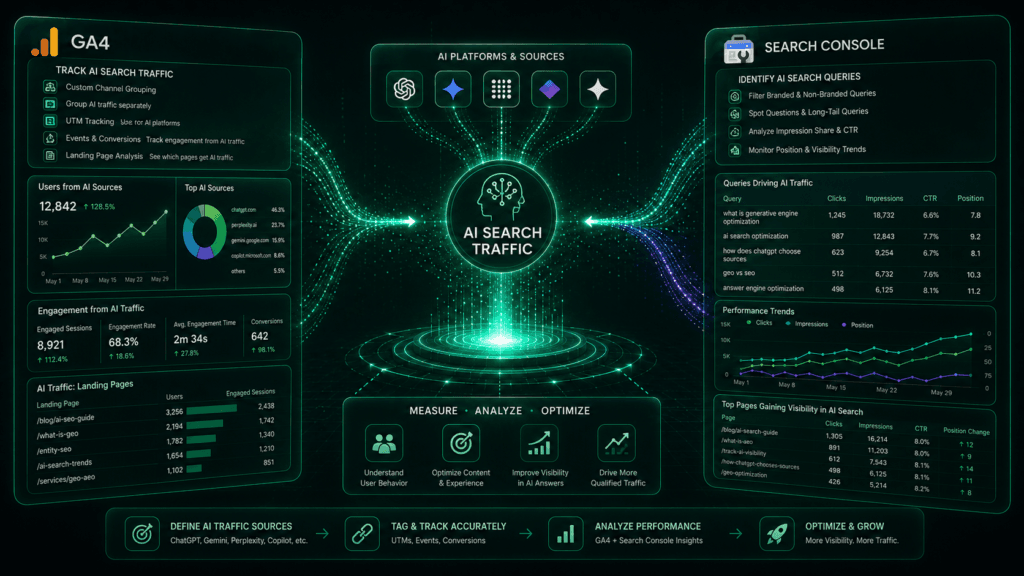
The analytics dashboards that marketers have relied on for decades are fundamentally cracking. As users transition from traditional search behaviors to conversational search engines, standard referral tracking is failing to capture the full picture. Millions of users are now getting answers directly inside LLMs without clicking standard blue links.
To survive this shift, agencies and webmasters must evolve their tracking mechanisms. Isolating AI Search Traffic inside Google Analytics 4 (GA4) and Google Search Console (GSC) is no longer an advanced preference—it is an absolute operational necessity to prove your digital ROI.
[User Query] ──> [AI Engine (ChatGPT/Gemini)] ──> [Synthesized Answer + Citation] ──> [GA4 Referral Traffic]
└──> [GSC AI Overview Impression]
The Blindspot Problem: Why Standard Analytics Misses AI Traffic
Traditional tracking set-ups categorize incoming web traffic into neat buckets like “Organic Search” or “Direct.” However, LLM interactions occur behind closed database walls. When ChatGPT or Perplexity crawls your site via a Retrieval-Augmented Generation (RAG) loop and provides a cited link to a user, that resulting click is often misclassified.
Without custom configuration, your GA4 AI traffic often maps blindly as “Direct” or standard organic referrals, masking the true impact of your Generative Engine Optimization (GEO) campaigns. If you do not explicitly isolate these models, your data will show a misleading SEO traffic drop while your brand is actually gaining substantial traction across the agentic web.
GA4 Tracking vs. Search Console Analytics
| Analytics Platform | Metrics Captured | Hidden Blindspot |
| Google Analytics 4 (GA4) | Clicks, user behavior, conversion rate, and explicit ChatGPT Referral Traffic. | Completely blind to impressions where an AI answered a user’s prompt without a click. |
| Google Search Console (GSC) | Keyword intent, organic impressions, and AI Overview indexing patterns. | Does not track third-party non-Google LLM behavior (like ChatGPT or Perplexity). |
How to Isolate AI Search Analytics inside GA4
Isolating AI referral traffic inside GA4 requires establishing explicit custom channel groups and advanced regex filters.
Step 1: Create a Custom AI Traffic Channel Group
- Navigate to your GA4 dashboard and go to Admin > Data Display > Channel Groups.
- Click Create new group based on the default channel definitions.
- Click Add new condition and name the channel AI Search Traffic.
- Define the channel using the rule: Source matches regex (.*chatgpt.*|.*perplexity.*|.*gemini.*|.*anthropic.*|.*claud.*|.*cohere.*).
Step 2: Build a Custom Exploration for ChatGPT Referral Traffic
Because ChatGPT uses the android-app://com.openai.chat referrer alongside web-based referrers, standard reporting leaves it fragmented. Go to Explore, build a blank technique map, and drop Session source/medium into your rows. Filter exclusively for your new regex terms to closely monitor your automated AI search visibility metrics.
Tracking AI Visibility in Google Search Console
While third-party LLMs must be tracked via referral strings, Google’s native AI Overviews (AIO) are monitored natively inside Google Search Console—though they require a specific filtration methodology.
Google Search Console -> Search Results -> + New Filter -> Page -> Filter by Semantic URL Cluster
- Monitor the ‘Unbundled’ Clicks: Google mixes AI Overview clicks directly with standard web results. To calculate your actual AIO share, look for performance surges on pages containing high informational intent.
- Track Entity Optimization Impressions: If your Entity-first SEO strategy is functioning correctly, you will observe structural impressions spiking under brand entities within GSC.
- Isolate Zero-Click URL Clusters: Group your URLs that utilize an answer-first optimization format. Contrast their lower click-through rates (CTR) against highly stable, elevated overall impressions to gauge where Google is utilizing your data directly on the SERP.
🛠️ Summary Action Item: Your Analytics Deployment Plan
To systematically modernize your agency’s reporting infrastructure and protect your pipeline against zero-click search growth, execute this rollout plan immediately:
- Deploy GA4 Regex Filters: Go into your GA4 properties today and implement the custom regex configurations to explicitly segment incoming GA4 AI Traffic from general traffic buckets.
- Audit Historical Referrals: Review your past 90 days of “Direct” and “Referral” traffic to unearth hidden patterns where AI engines like Perplexity or Claude have cited your content.
- Align Content Structure to Data Signals: Review how your high-impression, low-click pages are formatted. Ensure your SEO is serving as an infrastructure for AI search by injecting clean semantic markup and data nodes that conversational crawlers can cleanly index.
Frequently Asked Questions (FAQs)
Why doesn’t Perplexity traffic always show up in GA4?
Perplexity and similar systems often use aggressive privacy proxies or headless browsers when passing a user from an engine response to an external link, causing the traffic to register as “Direct” rather than an explicit referral string.
How does ChatGPT choose which brands to link to?
ChatGPT parses specific domains based on authoritative entity associations, verified structured lists, and real-time citation relevance within its RAG pipeline. For a deeper breakdown of this mechanism, read our full analysis on how ChatGPT chooses which brands to recommend.
Should I optimize for AI citations or standard backlinks?
Both are vital, but they serve distinct algorithmic elements. Traditional backlinks build core page authority for traditional indexing, while AI citations feed your entities directly into LLM knowledge models. Explore the structural core of this difference in our deep-dive guide on AI citations vs. backlinks.
What is the difference between Google’s AI Mode and AI Overviews?
Google’s AI Mode (Gemini Advanced interface) is a closed, conversational assistant layout that requires third-party referral tracking, whereas AI Overviews are inline features baked right into the core Google SERP, trackable via standard Search Console interfaces. See our comprehensive evaluation of Google AI Mode vs. AI Overviews for exact layout breakdowns.
How do I prepare my site layout for better AI indexing?
Implement a strict GEO audit checklist on your highest-performing assets, emphasizing concise, answer-first paragraphs beneath your primary subheadings to maximize extraction efficiency by AI crawlers.